

Overview
Memory is a system that remembers information about previous interactions. For AI agents, memory is crucial because it lets them remember previous interactions, learn from feedback, and adapt to user preferences. As agents tackle more complex tasks with numerous user interactions, this capability becomes essential for both efficiency and user satisfaction. Short term memory lets your application remember previous interactions within a single thread or conversation.A thread organizes multiple interactions in a session, similar to the way email groups messages in a single conversation.
Usage
To add short-term memory (thread-level persistence) to an agent, you need to specify acheckpointer when creating an agent.
LangChain’s agent manages short-term memory as a part of your agent’s state.By storing these in the graph’s state, the agent can access the full context for a given conversation while maintaining separation between different threads.State is persisted to a database (or memory) using a checkpointer so the thread can be resumed at any time.Short-term memory updates when the agent is invoked or a step (like a tool call) is completed, and the state is read at the start of each step.
In production
In production, use a checkpointer backed by a database:For more checkpointer options including SQLite, Postgres, and Azure Cosmos DB, see the list of checkpointer libraries in the Persistence documentation.
Customizing agent memory
By default, agents useAgentState to manage short term memory, specifically the conversation history via a messages key.
You can extend AgentState to add additional fields. Custom state schemas are passed to create_agent using the state_schema parameter.
Common patterns
With short-term memory enabled, long conversations can exceed the LLM’s context window. Common solutions are:Trim messages
Remove first or last N messages (before calling LLM)
Delete messages
Delete messages from LangGraph state permanently
Summarize messages
Summarize earlier messages in the history and replace them with a summary
Custom strategies
Custom strategies (e.g., message filtering, etc.)
Trim messages
Most LLMs have a maximum supported context window (denominated in tokens). One way to decide when to truncate messages is to count the tokens in the message history and truncate whenever it approaches that limit. If you’re using LangChain, you can use the trim messages utility and specify the number of tokens to keep from the list, as well as thestrategy (e.g., keep the last max_tokens) to use for handling the boundary.
To trim message history in an agent, use the @before_model middleware decorator:
Delete messages
You can delete messages from the graph state to manage the message history. This is useful when you want to remove specific messages or clear the entire message history. To delete messages from the graph state, you can use theRemoveMessage.
For RemoveMessage to work, you need to use a state key with add_messages reducer.
The default AgentState provides this.
To remove specific messages:
Summarize messages
The problem with trimming or removing messages, as shown above, is that you may lose information from culling of the message queue. Because of this, some applications benefit from a more sophisticated approach of summarizing the message history using a chat model.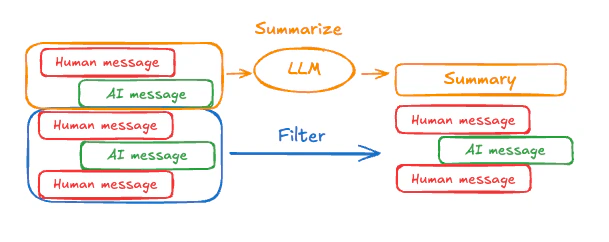
SummarizationMiddleware:
SummarizationMiddleware for more configuration options.
Access memory
You can access and modify the short-term memory (state) of an agent in several ways:Tools
Read short-term memory in a tool
Access short term memory (state) in a tool using theruntime parameter (typed as ToolRuntime).
The runtime parameter is hidden from the tool signature (so the model doesn’t see it), but the tool can access the state through it.
Write short-term memory from tools
To modify the agent’s short-term memory (state) during execution, you can return state updates directly from the tools. This is useful for persisting intermediate results or making information accessible to subsequent tools or prompts.Prompt
Access short term memory (state) in middleware to create dynamic prompts based on conversation history or custom state fields.Output
Before model
Access short term memory (state) in@before_model middleware to process messages before model calls.
After model
Access short term memory (state) in@after_model middleware to process messages after model calls.
Connect these docs to Claude, VSCode, and more via MCP for real-time answers.